I’ll be posting sporadically from Prague this week…
meanwhilst I also uploaded a song at myspace but I’ll put here for your listening enjoyment or
whatnot….
-owl
but go to myspace and sign up as my friend anyhow
[display_podcast]

I’ll be posting sporadically from Prague this week…
meanwhilst I also uploaded a song at myspace but I’ll put here for your listening enjoyment or
whatnot….
-owl
but go to myspace and sign up as my friend anyhow
[display_podcast]
I woke up this morning dazed and confused to the rough purring of Bela- on the pillow next to me in the way he likes to wake me up every day. I got up, made coffee, and sat down to read the AM
emails. That’s when I recalled my dream.
I was in Harvard Square. Well Not really Harvard Square but somehow I think that’s where my dream was taking place. I was on a side street sitting outside at some restaurant’s table. The ambiance on this side street was reminiscent of a Venetian restaurant; alley-like with people walking about looking for a place to eat or simply walking past the close quarters.
I was sitting at a table and two familiar people, a man and a woman, were down the alley walking towards me. She had my iPhone and was waving it toward. He was walking with her talking about how great the iPhone is. She was bulky in a Janis Joplin kind of way. it may have been lightly raining or just high fog.
From a distance, I watched the iPhone slip out of her hand and land on the cobbled street. Ha!-
I thought – the durability of an iPhone. She picked it up (they were still coming toward me, in the way things come at you dreams but hold their distance) looked at it, suggesting it was fine.
And then it slipped out again and crashed on the street again. This time the phone was not so resilient. I went over to my friends and she picked up the phone and showed it to me. The iPhone was completely smashed up but still together- kind of like the way safety glass holds together when a rock hits a windshield on a car. Crumpled.
Oh, I thought, my iPhone is broken as I stood there with my friends. She reached in her pocket and pulled out many several large sized bills in weird denominations- 100$ 250$ 40$ 50$ – each denomination had its own bill and for some reason I think the end total was around 650$ or more.
Fast forward into the light-I’m in a similar place a street still in Harvard Square but the ambiance is brighter. My friends aren’t there but I’m talking to a friend who I know buys many iPhones. I was telling him how I was going to get a new phone and he said he just upgraded all his phones and I could buy his old ones. I was thinking at this time how this would be great since I knew he is a careful user and the phone wouldn’t be all crapped up.
Next thing I knew, I was in Harvard Square on JFK Street at the OLD SBLI photo store where I used to buy black and white photo supplies. Come to think of it- I think this dream was in black and white.I was still with my friend who directed the guy behind the counter to get his phones. The counter guy reached below the counter and pulled out two ziploc baggies, each with a gen1 iPhone. I chose one after looking at them like I was buying a Zebra fish from a pet shop and I still had a whole bunch of bills in my hand so i counted out 200$ and gave it to him.
I remember pulling the SIM card out of my crumpled iPhone and trying to put it into the new old phone. It didn’t fit- the SIM card looked too large. I was having trouble pulling it out of the crumpled iPhone but I could see it in there distinctly. That’s when the purring started. That’s when I woke up.
So, that’s my first iPhone dream.
someone once said:
“Dreams are not worth the paper they’re printed on”
that could have been me – in a dream.
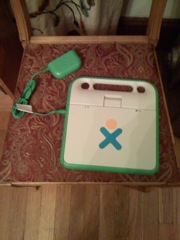
This is a picture of a chair on my porch that I’m using to demo a photo and blog post from the old iiphone.
C’est fino.

I was going to Blog about iPhone 2.0 software and the radical hit on battery life in my iphone
but I figured I’d get all worked up and then start a secondary rant about mobileME and how it’s
not quite there yet-partially because anything less than a 5mbs internet connection makes it creep
slowly and is prone to stuff like sendmail failures and flaky redraws, and various Browser incompatibilities.
no no no I’m simply posting a list of links to Apples updated Mac101 “one sheets” which are succinct
and useful to the new (and old) Apple user.
so Here they are:
Mac 101: Address Book
http://docs.info.apple.com/article.html?artnum=HT2486
Mac 101: Automator
http://docs.info.apple.com/article.html?artnum=HT2488
Mac 101: Dashboard
http://docs.info.apple.com/article.html?artnum=HT2492
Mac 101: Dictionary
http://docs.info.apple.com/article.html?artnum=HT2496
Mac 101: DVD Player
http://docs.info.apple.com/article.html?artnum=HT2499
Mac 101: Expose
http://docs.info.apple.com/article.html?artnum=HT2503
Mac 101: Font Book
http://docs.info.apple.com/article.html?artnum=HT2509
Mac 101: GarageBand
http://docs.info.apple.com/article.html?artnum=HT2510
Mac 101: iCal
http://docs.info.apple.com/article.html?artnum=HT2513
Mac 101: iChat
http://docs.info.apple.com/article.html?artnum=HT2515
Mac 101: iDVD
http://docs.info.apple.com/article.html?artnum=HT2516
Mac 101: iMovie
http://docs.info.apple.com/article.html?artnum=HT2479
Mac 101: iPhoto
http://docs.info.apple.com/article.html?artnum=HT2481
Mac 101: iSync
http://docs.info.apple.com/article.html?artnum=HT2484
Mac 101: iTunes
http://docs.info.apple.com/article.html?artnum=HT2489
Mac 101: Mac Essentials
http://docs.info.apple.com/article.html?artnum=HT2477
Mac 101: Mail
http://docs.info.apple.com/article.html?artnum=HT2500
Mac 101: Modify Your Windows
http://docs.info.apple.com/article.html?artnum=HT2487
Mac 101: Preview
http://docs.info.apple.com/article.html?artnum=HT2506
Mac 101: QuickTime Player
http://docs.info.apple.com/article.html?artnum=HT2507
Mac 101: Safari
http://docs.info.apple.com/article.html?artnum=HT2521
Mac 101: Spotlight
http://docs.info.apple.com/article.html?artnum=HT2531
Mac 101: TextEdit
http://docs.info.apple.com/article.html?artnum=HT2523
Mac 101: The Desktop
http://docs.info.apple.com/article.html?artnum=HT2472
Mac 101: The Finder
http://docs.info.apple.com/article.html?artnum=HT2470
Mac 101: VoiceOver
http://docs.info.apple.com/article.html?artnum=HT2529
With all the iPhone junk out there I was wondering when wordpress would have a portable entry client. MTedit has one and that was available from day 1.
But I’m swamped with social apps right now – it’s like the tower of Babel – emphasis on the babble. Maybe I can integrate all the SOapps here. Hmmmm.
__________________________________________________
the Ctrl key has a solid diamond on it
the Alt key has an open diamond on it
the Esc key has a white × inside a black circle
the Tab key has double arrows on it
the Tilde key has a tilde on it
the Frame key has an open rectangle on it
the F1 key is the same as the Neighborhood view key
the F2 key is the same as the Group view key
the F3 key is the same as the Home view key
the F4 key is the same as the Activity view key
the Delete key is the same as Fn-Erase.
the Page Up key is the same as Fn-up-arrow
the Page Down key is the same as Fn-down-arrow
the Home key is the same as Fn-left-arrow
the End key is the same as Fn-right-arrow
__________________________________________________
Keystroke Description
Alt-Tab Ctrl-Tab Cycle forward through running activities
Shift-Alt-Tab Shift-Ctrl-Tab Cycle backward through running activities
Ctrl-Tilde (See discussion) Cycle forward through running instances of the current activity
Shift-Ctrl-Tilde Cycle backward through running instances of the current activity
Ctrl-c Copy to clipboard
Ctrl-v Paste from clipboard
Ctrl-x Cut (and copy to clipboard)
Ctrl-a Select all (current input/dialog/text box )
Ctrl-q Quit activity
Ctrl-Esc Quit activity
Alt-Enter Toggle full-screen mode
Alt-Space Toggle tray visibility (works in Browse but not in Record)
Ctrl-u View source in Browse (opens copy of source in Write)
Fn-Space View source (system wide, although not enabled in all applications yet)
Ctrl-Alt-Erase Restart Sugar
Alt-1 Screen capture saved to Journal
Ctrl-Alt-F1 Console 1
Ctrl-Alt-F2 Console 2
Ctrl-Alt-F3 X Windows
Esc-Frame-RightArrow-Fn (the four corners keys on the keyboard)
Recalibrate touchpad (AKA Four finger salute); Fn should be pressed last.
Fn-UpArrow Page Up
Fn-DownArrow Page Down
Fn-LeftArrow Home
Fn-RightArrow End
Ctrl-BrightnessDown Backlight off black & white mode
Ctrl-BrightnessUp Full brightness color mode
Ctrl-VolumeDown Mute
Ctrl-VolumeUp Full volume
__________________________________________________
Browser Stuff
If you’re using a Mighty Mouse you may want to be careful about that scroll ball- the horizontal scroll is page back/forward when used to view a page. I switched mine out for a Kensington rf Mouse with scroll wheel and it works pretty well. I actually bought it because it was orange colored.
Use the space bar to scroll a full page and the up/down keys to scroll slowly.
Backspace does NOT run back to the last page viewed, and bookmarking is scant at best (save stuff to the journal if you need to) Of course this will keep the kids out of much of the internet’s “funky” side- but I’m not sure if that is good or bad.
I think actually it would be better to have a full out version of Seamonkey (formerly the full version of Mozilla) available to users. I kow Firefox/Opera is available but
the advantage of having Web/Mail/Composer in one place might be useful.
This Browser crashes especially while trying to switch from one Richly endowed page to the next.
Forget reading mail on .Mac. Flash will load but it is oh so not pretty, and higher demanding video crashes stalls or sputters.
So keep it simple on this browser. Newpapers and Google searches and of course the OLPC wiki work fine.
Hi folks –
I added a new category dedicated to my personal journey with the One Laptop Per Child XO laptop.
My experience/advice/hints and associated tidbits of information are derived from
a background of attempting to manage *nix operating systems and applications.
(BSD Unix/Apple mainly with a smattering of Ubuntu and a kickstart from having an
opportunity to work at MIT for 10 years from 1987-1996.)
I have an G1G1 XO laptop and after spending a couple months with it, I thought I’d post some hints about using it- what i like or don’t like about it and just some general thoughts about computing in general that specifically relate to this interesting and controversial topic.
I’m not sure if I’ll just simply add stuff here or create a new section, but I suppose I can do whatever I like since I am the MASTER of MY DOMAIN.
Hugs and Kisses, Everyone!
No no no no no no…this isn’t about hugs and kisses.. although what a nice sentiment.
I’m talking about the XO laptop. 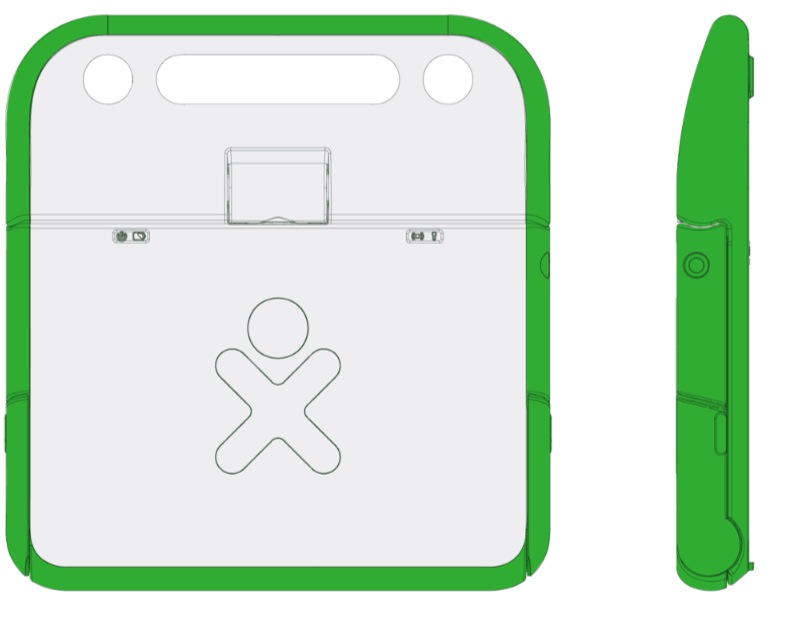
I’m waiting for this box to show up with a lovely little green laptop inside , which kind of replaces the 12″ G4 that I sold off last year, and though for my purposes- the iphone does what I needed a laptop for, i’m looking forward to a device as small and useful as the EMATE 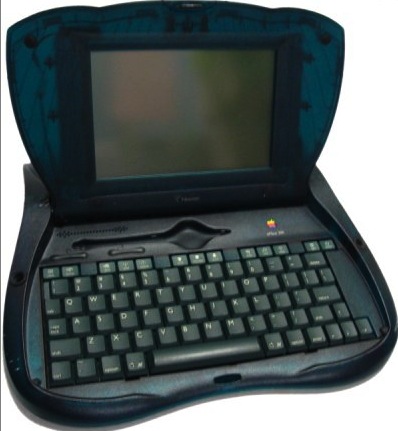
The eMate was a Newton in “user friendly clothing”. Without an XO on hand to accurately talk about the experience, I can talk about the emate since I used one as a laptop from 1996-1999. It was quite a wonderful device. In an era of 10bt ethernet getting upgraded to 100bt- the emate had two pcmcia ports which allowed dialup and networked capabilities with a Farallon card. It also used IR (like a Newton) to print to particular IR laser printers. And the software set was awesome, a text editor, spreadsheet, calendar, addressbook and draw program. Tons of Newton Games (i liked startrek the best) and user friendlyness, Very good handwriting recognition (but it had a keyboard) and tons of battery life. It had a web browser and AppleSpeech – so it could announce
meetings! But -in retrospect- the coolest part was the development environment. I’m not a programmer but anyone who
opened up the Newton Dev kit and read through the process would get a great running start at object oriented development.
Persistent memory, Soups, and GUI all integrated to make a foundation for programming a Newton easy- and understandable from a non programmers perspective.
I know the XO will have various environments for programming. It’s not meant to be an “adult” laptop but i can see the adoption coming once these things (and especially Mesh Networking) become sociable. Social websites, like MySpace and FaceBook, LinkedIn and etc etc. could get a meaningful extension once collaboration via Mesh becomes commonplace (indeed the computer revolution is turning the corner on the MY COMPUTER generation- we’ll be using MY NETWORK instead-
the extensible computing ENVIRONMENT)
So even though the XO is primarily an education device- i think we’ll see it extend beyond that- not in commercial capacity (leave that to Intel) – but in a social capacity- a geek toy for kids- that will ultimately, not necessarily, be used
to extend the network of the world.